


ClimateCruise
4.27.00 Reviews
App Specs
- Version
- 4.5.8
- Updated On
- License
- Free
- Downloads
- 10,000+
- Developer
- DurkesLLC
- Categories
- Weather
- Platform
- Android
Screenshots
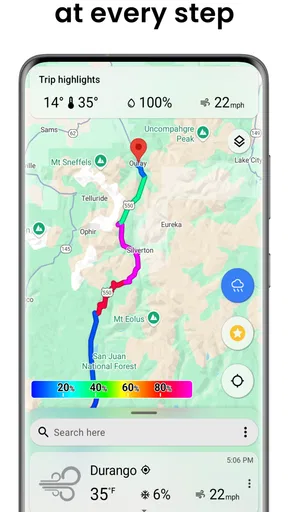
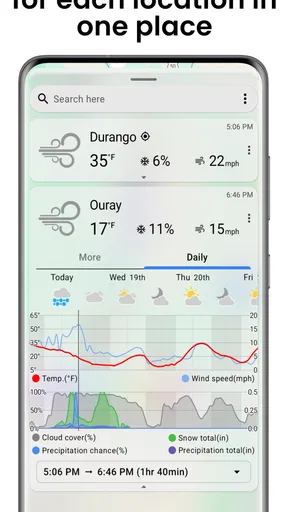
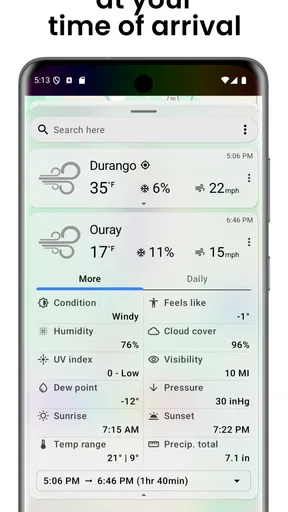
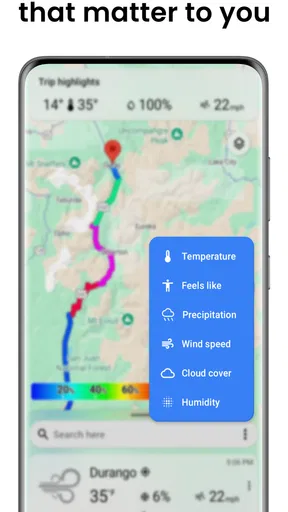
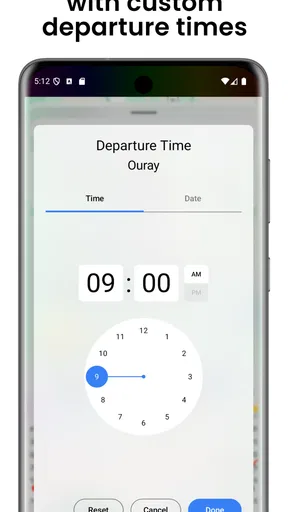
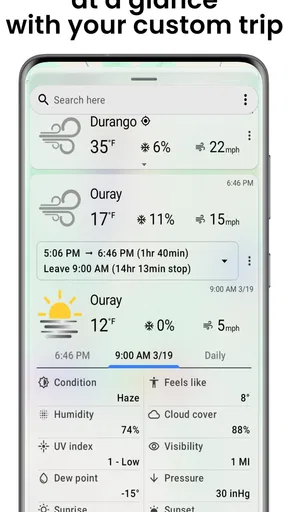
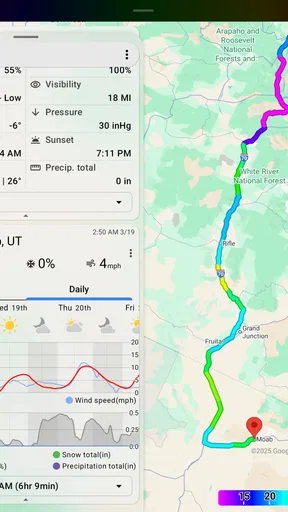
 Analysis by AppCompare
I approached ClimateCruise as a travel weather app rather than another general forecast screen. Its main appeal is the idea of checking the conditions for an entire journey in one place, which can be more useful than repeatedly searching individual destinations. After spending time with it, I found that its value depends less on flashy extras and more on whether your trip planning benefits from a broad, side-by-side view of weather.
That focus makes it interesting for road trips, multi-stop holidays, and anyone who wants to compare places before deciding when to leave. It is a free app in the weather category, developed by DurkesLLC, and it is aimed at an Everyone audience. I would not describe it as a complete replacement for every conventional weather service, though. Its usefulness is strongest when you are thinking about movement between locations, while people who mainly need minute-by-minute local warnings may prefer a more specialized alternative.
Getting past the first points of friction
The first thing I would tell a new user is to approach ClimateCruise with a clear trip in mind. If you open it expecting a familiar single-city forecast, the travel-oriented presentation may feel less immediate than a standard weather app. The app makes more sense when you think in terms of a route, several destinations, or a planned outing where conditions at more than one place matter.
A common source of confusion with travel weather tools is the difference between a place name and a complete travel plan. Entering one location may give you useful information, but it does not necessarily answer the question you actually have: whether the weather will remain comfortable as you move from one stop to another. I found it more productive to decide beforehand which locations matter, then use the app to compare them instead of treating the first result as the whole experience.
Another practical issue is expectation. A view that gathers weather together can simplify planning, but it cannot remove uncertainty from a changing forecast. If you are planning an outdoor event several days ahead, use the app as a planning aid rather than a guarantee. Check again closer to departure, especially when a small change in rain, wind, or temperature would affect your route.
The app has a 4.2 average from around 33 ratings, which suggests a generally positive reception while still representing a relatively small public sample. I would read that as encouragement, not proof that every traveler will find the interface effortless. Weather apps are especially personal: one person wants a quick glance, while another wants deeper local detail and alerts.
Setup checks that save time
Before judging the app, I recommend checking the basics. Make sure the location names you use are specific enough to distinguish similarly named places. A town, region, or destination can be interpreted differently from a major city, and a vague search can lead to a result that is technically valid but not the place you intended to visit.
Worth Reading Before You Choose

Flipboard Shows What News Apps Must Do Beyond the Feed

Switching to Android Auto Means Rethinking Your Driving Routine

Google Calendar Makes a Crowded Week Easier to Manage

Ludo King Makes the Most of the Minutes Between Plans

Baby Panda World Brings Quick Play to Modern Phones, but Its Game Library Feels Busy

ESPN’s Live Game View Makes Following Close Games Easier
It is also worth confirming that the device meets the software requirement. ClimateCruise supports iOS 12 or later, so an older device may be the reason an installation or update does not proceed normally. On a compatible device, the current version is 4.5.8. If the app behaves strangely after an update, closing and reopening it is a sensible first step before assuming the weather information itself is wrong.
Because the app is free, trying it does not require a purchase decision at the start. There are in-app purchases priced at $1.00 per item, so I would still look carefully at any purchase prompt and decide whether it is relevant to the way you plan to use the app. For a simple trip check, I would first explore the core experience and only consider an optional purchase if it clearly solves a problem I actually have.
One useful habit is to prepare your route outside the app first. Write down the places you expect to visit and the order in which they matter. This avoids wasting time searching randomly and makes it easier to notice whether the app is helping you compare a journey or merely showing isolated forecasts. It also gives you a reference point if you later need to repeat the same check.
If a location does not appear as expected, try a more precise spelling or a nearby, better-known place rather than repeatedly tapping the same search. That is a general troubleshooting step, not a claim about a particular search system. Location databases can interpret names differently, and narrowing the wording is often faster than assuming the app has failed.
Building a useful travel-weather routine
My preferred workflow is to use ClimateCruise at three separate moments. First, I use it during early planning to compare the broad conditions along a trip. This helps answer practical questions such as whether a coastal stop looks more comfortable than an inland alternative or whether a particular day seems better suited to driving than sightseeing.
Second, I check the route again shortly before leaving. This is where the app becomes more valuable than a one-time forecast screenshot. A travel plan can change, and the most useful information is the information you review after your destinations and timing are reasonably settled. I would avoid making a complicated itinerary based on a forecast checked only once.
Third, I use it as a quick reference during the trip rather than as the sole source for serious decisions. If weather becomes hazardous, official local guidance and more detailed warning services should take priority. ClimateCruise can help you see the wider picture, but a broad travel view should not replace local information when safety is involved.
A less obvious advantage of this approach is that it encourages you to compare conditions instead of focusing on the most attractive forecast at your final destination. A pleasant arrival forecast does not automatically mean the drive there will be comfortable. Looking across the journey can reveal a less appealing stretch that deserves an earlier departure, a different stop, or a backup plan.
There is also a trade-off. A consolidated travel view can reduce the mental effort of checking many places, but it may feel less satisfying to someone who wants extensive detail for one neighborhood. If your daily routine depends on highly localized weather decisions, a dedicated local forecast service may be the better companion. I see ClimateCruise as a planning layer, not necessarily the most detailed instrument in a weather enthusiast’s toolkit.
Recovering when the workflow goes wrong
When the results do not match what I expect, I start by separating input problems from weather problems. I recheck the destination spelling, confirm that I am looking at the intended place, and repeat the search only after deciding what information I need. Randomly changing several things at once makes it harder to identify the cause.
If the app appears stuck, I would close it, reopen it, and try a simpler location before rebuilding a longer trip view. This is especially useful after switching between several destinations quickly. If a basic check works but a more complicated plan does not, simplify the workflow and add locations one at a time. That approach helps identify whether the issue comes from one particular entry or from the overall setup.
Network conditions can also affect any weather application. If information loads slowly or appears incomplete, check whether other apps can reach the internet before blaming ClimateCruise. Moving from a weak connection to a more reliable one, then reopening the app, is a safer general test than repeatedly refreshing an uncertain result.
I would also avoid interpreting a stale-looking forecast as an immediate app failure. Weather information changes, and a forecast may differ from what you see outside because of timing, location, or normal prediction limits. Compare the place, the forecast period, and the real-world conditions before deciding that something is broken.
If reinstalling becomes necessary, I would first make a note of the destinations and route details I want to recreate. That small precaution prevents a frustrating restart. I would not assume that every previous selection will return automatically after reinstalling, so keeping your trip plan separately is sensible whenever the itinerary matters.
For purchase-related friction, read the wording on the purchase screen carefully and avoid tapping through simply to dismiss a prompt. Since individual in-app items cost $1.00, the amount is modest, but the important point is understanding what you are selecting. If the app remains useful without the item, I would continue with the free experience until a clear need appears.
When the app is not the real cause
Weather apps are easy to blame because their information is compared with something visible outside the window. That comparison is not always fair. A forecast represents a location and time window, while your actual experience may be affected by elevation, shade, traffic, wind exposure, or a short local shower that does not describe the wider area.
Travel itself creates another mismatch. If you are moving between places, the weather can change faster than a single destination view suggests. A sunny departure and a rainy arrival do not necessarily mean the application made an error; they may simply reflect different local conditions along the route. This is one reason the app’s travel perspective is useful, provided you read it as a comparison rather than a promise.
Device settings can create apparent problems too. An incorrect clock, an outdated operating system, or a temporary connection issue can make information appear delayed or prevent a normal refresh. I would check those basics before concluding that the app is unreliable. On supported devices, a clean restart and a simpler location test often clarify whether the problem is technical or interpretive.
There are situations where I would choose another type of weather tool. For severe-weather monitoring, I would prioritize official alerts and local emergency information. For detailed radar work, specialist forecasting, or very precise outdoor planning, an app built around those functions may be a better fit. ClimateCruise is more convincing when the question is, “How do conditions compare across my trip?” rather than, “What is happening above this exact street right now?”
It may also be the wrong choice for someone who wants a feature-heavy dashboard with extensive customization. The app’s appeal is its focused travel purpose. If you prefer to spend time adjusting layers, widgets, and technical forecast views, a broader weather platform could offer more depth. I would not treat that as a flaw so much as a reminder to match the tool to the decision you need to make.
Who will get the most from it
I think ClimateCruise suits people planning road trips, visitors moving between several destinations, and travelers who find it tiring to check each city separately. It can also help families decide whether to keep an outdoor stop, move it to another day, or build a backup activity into the itinerary. The benefit is not just seeing weather; it is reducing the number of separate checks needed before making a travel decision.
Consider a realistic weekend drive with a morning departure, an afternoon stop, and an overnight destination. A conventional local weather app may require three separate searches. With ClimateCruise, the useful question becomes whether the whole sequence makes sense together. If the middle stop looks uncomfortable while the start and finish are fine, you can shorten that visit or rearrange the day instead of discovering the problem after arriving.
I would be more cautious recommending it to someone who only wants a permanent home-screen forecast for one location. That person may find a standard weather app faster and more familiar. Likewise, travelers who need detailed safety information should use ClimateCruise alongside, not instead of, authoritative local sources.
The app is free to begin with and carries an Everyone content rating, which makes it approachable for general household trip planning. Its presence on more than 10K installs indicates that it has reached a modest audience, although I would still base my decision on the workflow rather than popularity alone. A smaller app can be exactly right for a narrow task, but it may not offer the same breadth as the largest weather services.
My practical verdict after using it
ClimateCruise works best when I treat it as a travel-planning shortcut. It brings attention to the weather between destinations, not only the weather at the place I eventually want to reach. That shift is genuinely useful for multi-stop journeys and makes the app more distinctive than a basic single-location forecast.
The main friction is learning to think in terms of a route and to troubleshoot methodically when a location or result does not look right. Clear destination names, a compatible device, a stable connection, and a simple one-location test can prevent most avoidable frustration. I also recommend checking forecasts again near departure and keeping a separate note of important itinerary details.
My recommendation is positive but specific: try it if your weather questions involve travel, comparison, and timing across several places. Keep another source available for severe conditions, detailed local forecasting, or highly technical outdoor decisions. In that role, ClimateCruise is a practical companion rather than an all-purpose weather authority, and that honest limitation is also what keeps its purpose clear.
DurkesLLC has made a focused weather app that can earn a place in a traveler’s planning routine without demanding that it replace every other tool. I would install it before a trip with multiple stops, test the route early, and decide from there whether its consolidated view genuinely saves me time. For the right traveler, that simple comparison can be more valuable than a crowded forecast screen.
Pros
- Clear climate data helps users plan routes more comfortably.
- Useful forecasts can make outdoor travel safer and more predictable.
- Cruise-focused information is convenient for trip preparation.
- A simple mobile format makes checking conditions quick.
- Helpful for comparing weather conditions across destinations.
Cons
- Forecast accuracy may vary by destination and data availability.
- Some features may require an internet connection while traveling.
- Limited value for users who do not take cruises or coastal trips.
- Weather information can change quickly after it is displayed.
- Battery and mobile data usage may increase during extended trips.
FAQs for ClimateCruise
What is ClimateCruise and what does it offer?
ClimateCruise is designed to help users explore climate-related information in a convenient mobile format. Depending on the available version and region, it may present environmental data, climate trends, educational content, visualizations, or tools for understanding how climate conditions affect places and activities. Before downloading, check the app’s store description to confirm its current features, supported locations, and whether its information is intended for education, travel planning, research, or general awareness.
Is ClimateCruise free to download and use?
The download price and available features can vary between Android and iOS, as well as by country. ClimateCruise may be free to install while offering optional purchases, subscriptions, premium content, or features that require an account. Review the official store listing carefully before installing, especially the in-app purchase section and subscription terms. If a trial is offered, check when billing begins and how cancellation works through Google Play or the App Store.
Does ClimateCruise require an internet connection or location access?
ClimateCruise may need an internet connection to retrieve updated climate information, maps, forecasts, articles, or other online content. Some sections could remain available offline after loading, but this should not be assumed unless the developer clearly confirms it. The app may also request location permission if it provides local conditions or place-based recommendations. You can usually deny location access, although doing so may limit personalized features.
How accurate and up to date is the information in ClimateCruise?
Climate and environmental information can change frequently, and accuracy depends on the data sources, update schedule, geographic coverage, and presentation used by ClimateCruise. Treat the app as a helpful informational tool rather than the sole source for safety-critical decisions, travel disruptions, health concerns, or severe weather preparation. Check the app’s source notes, timestamps, disclaimers, and update history, and compare important information with official government or scientific services.
What privacy information should I consider before installing ClimateCruise?
Before downloading ClimateCruise, review its Google Play or App Store privacy section and the developer’s privacy policy. Pay particular attention to whether the app collects location data, device identifiers, usage information, contact details, or analytics data, and whether information is shared with service providers or advertising partners. Only grant permissions that are necessary for the features you plan to use, and check account and deletion options if registration is required.


